Export data from Neptune 3.x
Use Neptune Exporter to migrate your data from Neptune 3.x to other platforms, such as MLflow or Weights & Biases.
Exports should already be complete. If yours is not, you are operating without a buffer.
Neptune services shut down permanently on March 5, 2026. All remaining data will be deleted at shutdown, and any active exports will terminate. No extensions or recovery will be possible.
If you are encountering export issues, contact us immediately at support@neptune.ai.
Verify Neptune version
To check which version of the Neptune app you are using:
- Log in to your Neptune workspace.
- Go to Help → About Neptune.
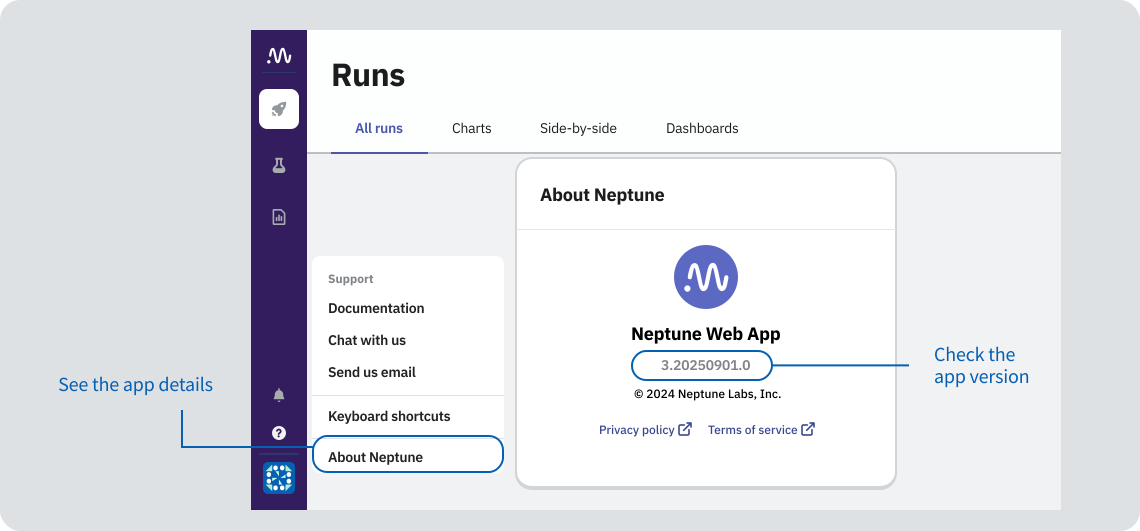
The version number should be 3.2025XXXX.X.
Example workflows
For detailed instructions, see the Neptune Exporter README file on GitHub.
Export an entire project
To export all runs from the specified projects to your local storage, run:
uv run neptune-exporter export \
  -p "my-workspace/my-project-1" \
  -p "my-workspace/my-project-2" \
  --exporter neptune3 \
  --data-path ./exports/data \
  --files-path ./exports/files
This command saves the Parquet data to the ./exports/data directory and the files to ./exports/files.
Project selection: explicit or workspace discovery
You can choose projects in two ways (do not mix both in one command):
- Explicit mode: Pass one or more
-p/--project-ids(or setNEPTUNE_PROJECT). - Discovery mode: Pass
--workspaceto export all projects in that workspace, optionally with--project-pattern(include regex on project names) and--project-exclude-pattern(exclude regex on project names). Patterns match the project name only (the part afterworkspace/).
Export all projects from a workspace:
uv run neptune-exporter export \
  --workspace "my-workspace" \
  --exporter neptune3 \
  --data-path ./exports/data \
  --files-path ./exports/files
Export only projects whose names match an include pattern:
uv run neptune-exporter export \
  --workspace "my-workspace" \
  --project-pattern ".*prod.*" \
  --exporter neptune3 \
  --data-path ./exports/data \
  --files-path ./exports/files
Export with both include and exclude patterns:
uv run neptune-exporter export \
  --workspace "my-workspace" \
  --project-pattern ".*prod.*" \
  --project-exclude-pattern ".*archive.*" \
  --exporter neptune3 \
  --data-path ./exports/data \
  --files-path ./exports/files
To improve the export speed, you can:
- Split the export by project or run across different processes
- Export only a relevant subset of projects, runs, or attributes
- Exclude files from the export
If you're exporting a large amount of data, we recommend exporting not just across different processes, but different machines altogether. This way, disk I/O is not a bottleneck.
Export specific runs
To export only runs that match the specified pattern, use the -r flag:
uv run neptune-exporter export \
  -p "my-workspace/my-project" \
  --exporter neptune3 \
  -r "RUN-.*" \
where RUN-.* is a regular expression that matches all run IDs starting with RUN-.
The run ID refers to the user-specified or auto-generated string stored in the
sys/custom_run_idattribute of a run.
Export specific attributes
To export only attributes that match the specified patterns, use the -a flag:
uv run neptune-exporter export \
  -p "my-workspace/my-project" \
  --exporter neptune3 \
  -a "metrics/accuracy" -a "metrics/loss" -a "config/.*"
Validate your export
See what was exported by running the following command:
uv run neptune-exporter summary --data-path ./exports/data
This command returns the number of exported projects or runs, attribute types, and the basic step statistics.
For detailed instructions, see the Neptune Exporter README file on GitHub.
Migrate to another tool
You can migrate your exported data to another tool. See the following guides:
We do not endorse any of these tools. They are listed for your convenience only.