Migration overview
Use Neptune Exporter to export your data from Neptune and optionally load it into other experiment tracking tools.
Migration steps:
- Check your Neptune version and choose the corresponding export guide.
- Use the Neptune Exporter CLI to get your data from Neptune.
- (Optional) Load the data into another tool.
Exports should already be complete. If yours is not, you are operating without a buffer.
Neptune services shut down permanently on March 5, 2026. All remaining data will be deleted at shutdown, and any active exports will terminate. No extensions or recovery will be possible.
If you are encountering export issues, contact us immediately at support@neptune.ai.
Neptune Exporter
Neptune Exporter is a command-line tool for downloading your data from Neptune and migrating it into other platforms. It supports the following actions:
- Download runs from Neptune to your local storage as Parquet files.
- Select projects by explicit project IDs or by workspace discovery (export all projects in a workspace, with optional include/exclude regex filters on project names).
- (Neptune 2.x only) Optionally export model registry data (models and model versions) to separate Parquet and files directories; project selection supports the same explicit and workspace-discovery modes.
- Load the Parquet files into MLflow, Weights & Biases, Comet, ZenML, Lightning AI, Minfx.ai, or GoodSeed. The run structure – including forks, steps, and attributes – is preserved as closely as possible.
- Validate your exports with a human-readable summary of the data layout (runs and, if exported, model registry).
You can use Neptune Exporter with both Neptune 2.x and Neptune 3.x. The exported files are in the same Parquet format, regardless of the Neptune version.
The README file contains detailed prerequisites and complete usage instructions.
Check your Neptune version
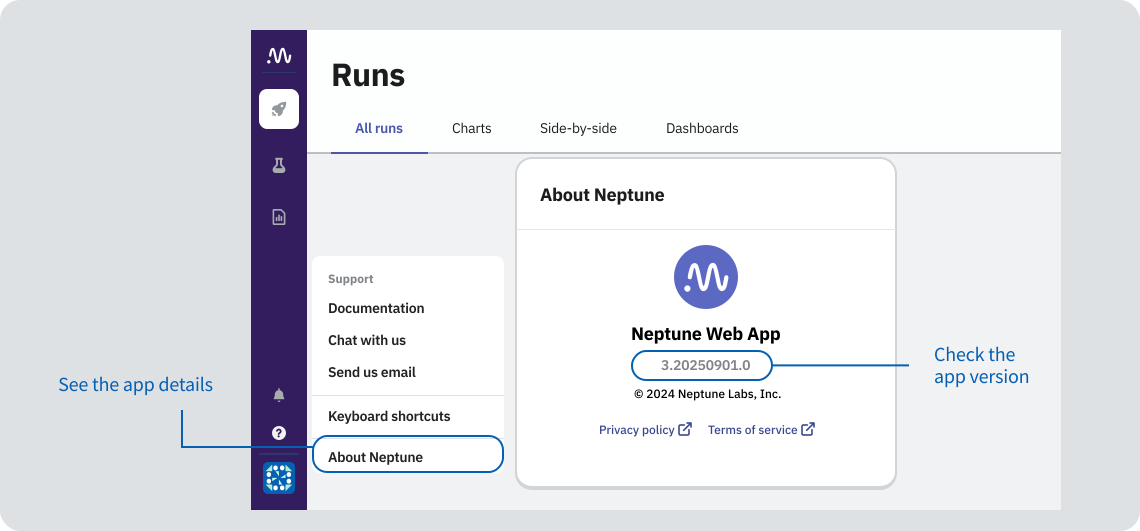
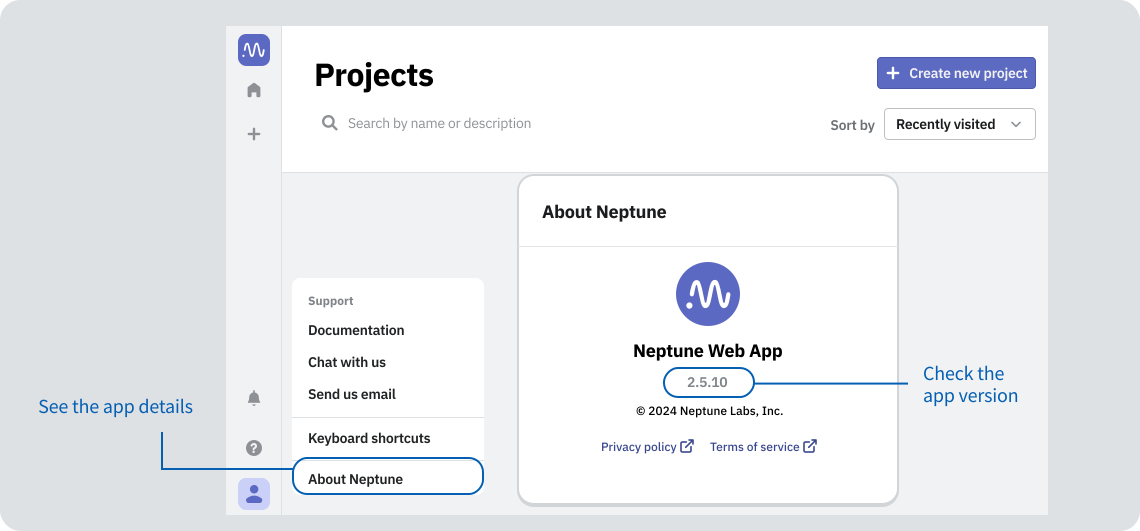
To check which version of the Neptune app you are using:
- Log in to your Neptune workspace.
- In the left sidebar, go to the help menu → About Neptune.
- Neptune 3.x
- Neptune 2.x
More ways to check your Neptune version
-
Docs URL:
- If you usually read docs at docs.neptune.ai, you're on Neptune 3.x.
- If you usually read docs at docs-legacy.neptune.ai (legacy docs), you're on Neptune 2.x.
-
Python packages/imports:
- If you use
neptune-scaleand/orneptune-query(fromneptune_scale import ...), you're on 3.x. - If you use the
neptunepackage (importneptune), you're likely on 2.x.
- If you use
Not sure? Email us a snippet of your requirements.txt/pyproject.toml (or pip show) at support@neptune.ai and we'll confirm.
Best practices
To improve the export speed, you can:
- Split the export by project or run across different processes
- Export only a relevant subset of projects, runs, or attributes
- Exclude system metrics and files from the export
For examples, see the Neptune 2.x or Neptune 3.x export guides.
If you're exporting a large amount of data, we recommend exporting not just across different processes, but different machines altogether. This way, disk I/O is not a bottleneck.